
ローカル環境からのメール通知など - WordPress

旧サイト記事の移行
先日、macOSをHigh Sierraにアップデートしてそれに合わせてWordPressのテスト環境(VCCW)を作り直しました。 ざっとですが、メモ書き。 VirtualBox-5.1.30 Download VirtualBox 2017年10月19日時点で VirtualBox-5.2.0 がリリースされていますが、vagrant-2.0 は VirtualBox-5.2 には未対応なので、5.1系にしておきます。 ちなみに VirtualBox-5.2 をインストールした状態で vagrant up とすると、下記のエラーメッセージが表示されて起動できません。
The provider ‘virtualbox’ that was requested to back the machine ‘vccw.test’ is reporting that it isn’t usable on this system. Thereason is shown below: Vagrant has detected that you have a version of VirtualBox installed that is not supported by this version of Vagrant. Please install one of the supported versions listed below to use Vagrant: 4.0, 4.1, 4.2, 4.3, 5.0, 5.1 A Vagrant update may also be available that adds support for the version you specified. Please check www.vagrantup.com/downloads.html to download the latest version.
$ vagrant --version Vagrant 2.0.0 VCCWはこちら。 現時点で vccw-3.9.0.zip がダウンロードできます。 zipファイルを展開して適当な場所に移動。 vagrant up してブラウザで、 http://vccw.test/ を開いて WordPress が利用できることを確認します。 [caption id=“attachment_2950” align=“aligncenter” width=“300”]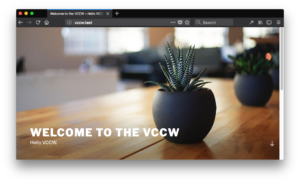 ](</images/wp/2017/10/Screen-Shot-2017-10-19-at-13.20.01.png>) welcome to the vccw[/caption] 次にテスト環境(PHPUnit)の確認。 何らかのプラグインを開発する前提です。 こちらの記事を参考にさせていただきました。m(__)m WP-CLI+PHPUnitを使ったWordPressプラグインのユニットテスト(2)
 $ vagrant ssh $ cd /var/www/ $ wp scaffold plugin myplugin $ cd /var/www/html/wp-content/plugins/myplugin $ bash bin/install-wp-tests.sh wordpress_test root 'wordpress' localhost latest これで PHPUnit のテスト環境が整うので、 $ phpunit ... OK (1 test, 1 assertion) となればOK。 次に、ローカル環境でWordPressのユーザアカウントを登録する場合などの、 メール通知が動くようにします。 利用するプラグインは、 Cimy Swift SMTP ロリポップレンタルサーバーのメールサーバーを利用する場合の設定です。 [caption id=“attachment_2951” align=“aligncenter” width=“291”]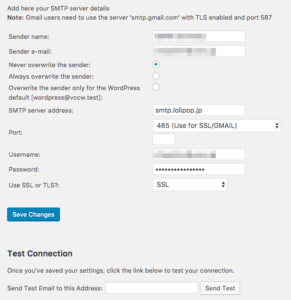 ](</images/wp/2017/10/Screen-Shot-2017-10-19-at-13.38.16.png>) Cimy Swift SMTP for Lolipop[/caption] SMTP Server: smtp.lolipop Port: 465(Use for SSL/GMAIL) メールアカウント、パスワードは適宜入力 Use SSL or TLS?: SSL [Save Changes]ボタンをクリックして設定を保存。 Test Connectionで自分のメールアドレスにメールが届くことを確認します。