
Swiftメモ

旧サイト記事の移行
* Button.setTitle* Timer.scheduledTimer* AVAudioPlayer* UserDefaults* UINavigationController画面遷移
セクション「画面遷移」* Viewのコードを書くSwiftファイルを追加(HogeViewController)* Main.storyboard -> ViewController * Editor -> Embed In -> Navigation Controller * Navigation Controller が追加される(画面遷移をナビゲーションするためのクラス) * ViewController に Navigation Item が追加される* Object Library -> ViewController をエディタエリアに追加* 新しい View の Identity inspector -> HogeViewController* Date Picker を配置設定画面
セクション「設定画面」* DatePickerのバグ対応 * 1回目のValueChangedはイベントが発生しない。 * datePicker.setDate() すると良さそう。Swift - UITest
セクション「Swift - UITest」Understanding UI Testing using iOS, Xcode 9 and Swift
Identity inspector
セクション「Identity inspector」Accessibility -> identifier でIDをセットしてみる。 IDの問題ではなくてテストの順番で今どのViewを開いているかが問題? でもなくて、 setUp() で 毎回、 XCUIApplication().launch() しているのでSliderの値が変わっていると、Labelの内容も変化させているので、 初期値の Label ではなくて、Slider に合わせた値がView上に残っているため、 操作によって変化しない ID が必要、ということでした。 ###Swift - Slider by step (stackoverflow)UISlider with increments of 5
code:swift let step: Float = 5 @IBAction func sliderValueChanged(sender: UISlider) {    let roundedValue = round(sender.value / step) * step    sender.value = roundedValue    // Do something else with the value
 }
Swift - UserDefaults
セクション「Swift - UserDefaults」UserDefaults.standard register(defaults:)
Swift - Layout
セクション「Swift - Layout」Auto Layout Guide Simple Constraints Adaptivity and Layout 横に部品を2個配置した場合の設定例など。 Views with Intrinsic Content Size ボタンをbottomに寄せれば良さそう。 ラベルは中央。
Labelの配置例
セクション「Labelの配置例」Label.centerX = Superview.centerXLabel.top = Superview.centerYLabel.leading = Superview.leadingMargin + 80Auto Layout Localization: Fixed leading and trailing constraints may cause clipping, one of them should have a constant ≥ standard space.
上のWarningが出る場合は、Size Inspector -> Constraints のなかで leading / trailing が固定値(=)になっているものを ≥ に変更する。
Label, Button を縦に配置
セクション「Label, Button を縦に配置」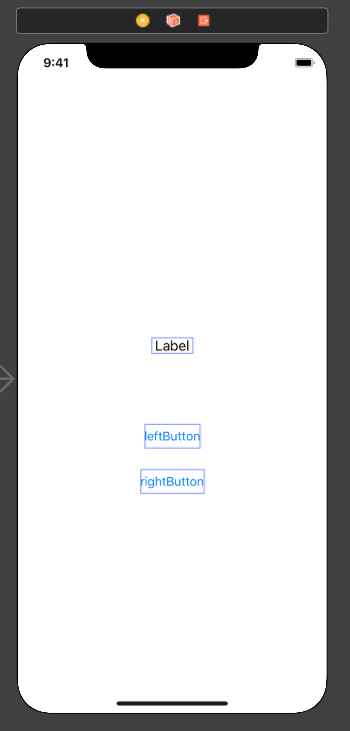
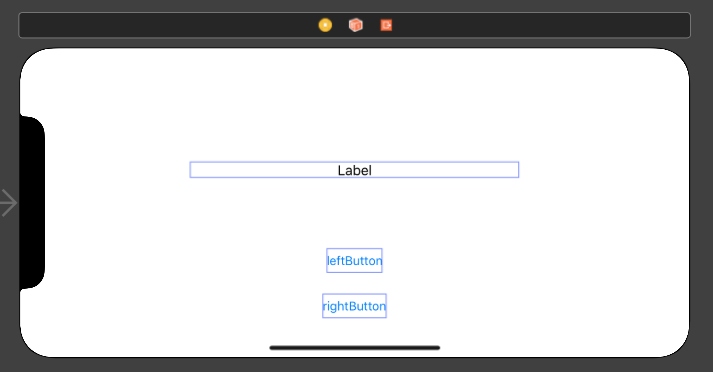
Safe Area.trailing ≥ rightButton.trailing + 57 Label.centerX = centerX Label.top = CenterY -50 Label.leading = Safe Area.leading + 162 leftButton.top = Label.top + 105 LeftButton.centerX = centerX LeftButton.leading ≥ Safe Area.leaging + 100 rightButton.leading ≥ Safe Area.leading + 57 rightButton.centerX = centerX rightButton.top = leftButton.bottom + 25上を改善
Label.centerX = centerX Label.centerY = CenterY -50 Label.leading = Safe Area.leading + 162 leftButton.top = Label.top + 105 LeftButton.centerX = centerX LeftButton.leading ≥ Safe Area.leaging + 100 rightButton.leading ≥ Safe Area.leading + 57 rightButton.centerX = centerX rightButton.top = leftButton.bottom + 25ボタンを横に並べてみる
セクション「ボタンを横に並べてみる」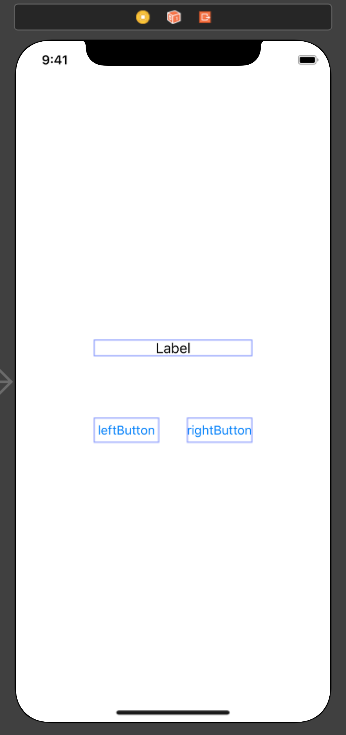
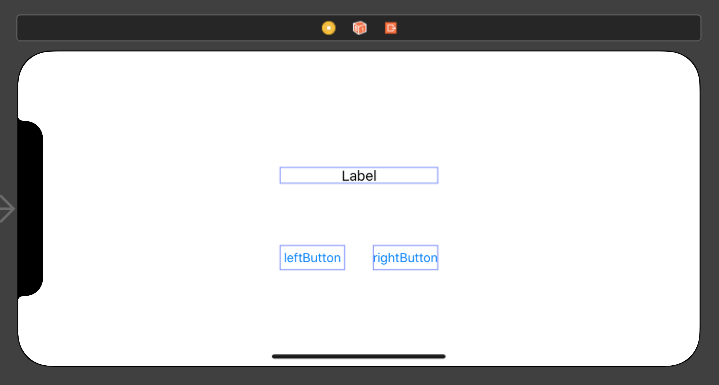
Safe Area.trailing ≥ rightButton.trailing + 93 Label.trailing = rightButton.trailing Label.leading = leftButton.leading Label.centerY = centerY - 40 leftButton.lastBaseline = rightButton.lastBaseline leftButton.centerX = centerX - 55.5 leftButton.top = Label.bottom + 73 leftButton.leading ≥ Safe Area.leading + 93 rightButton.centerX = centerX + 55.5 rightButton.width = leftButton.width